马上注册,结交更多好友,享用更多功能,让你轻松玩转小K网。
您需要 登录 才可以下载或查看,没有账号?立即注册

×
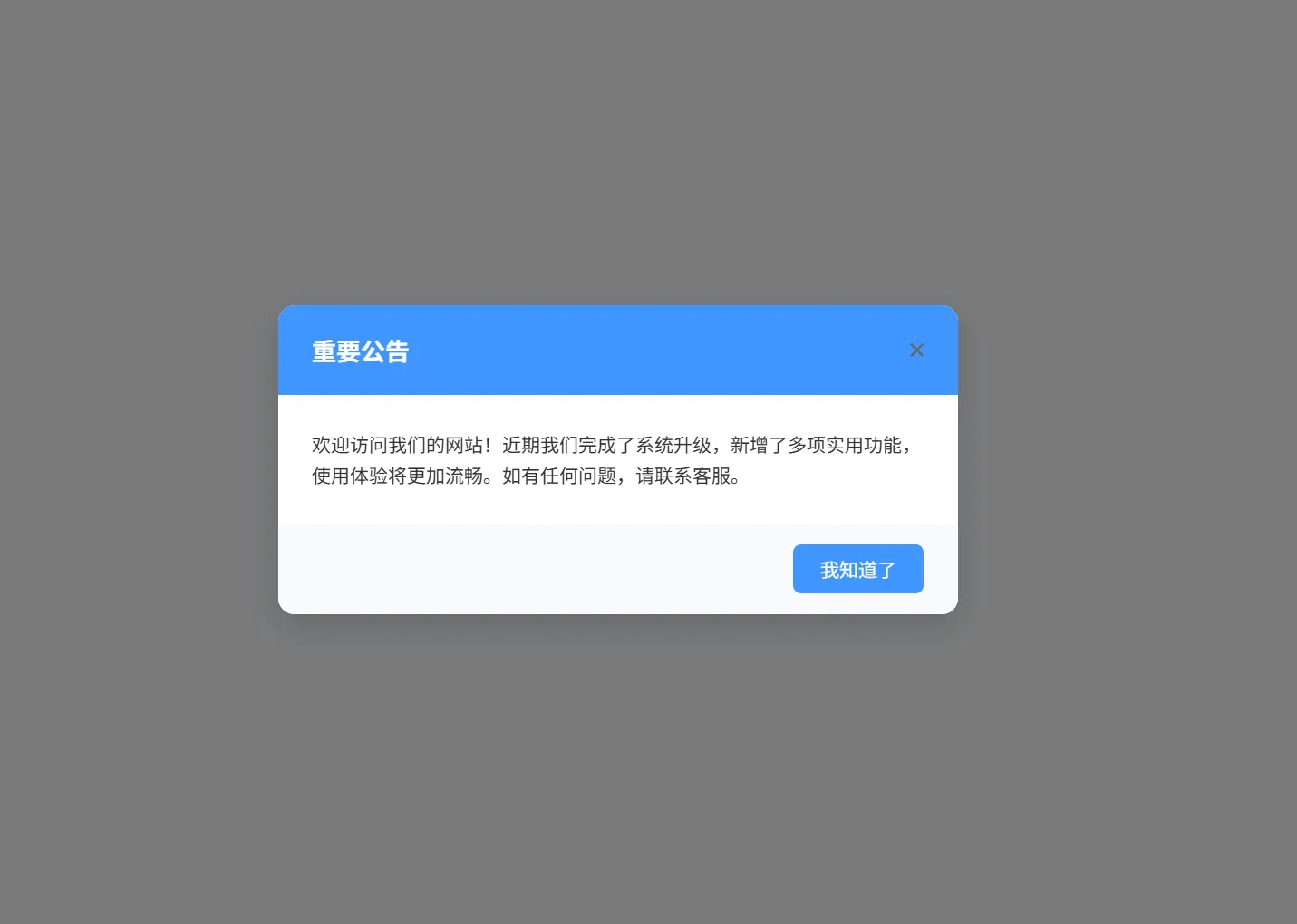
- <!-- 公告弹窗 -->
- <div id="announcement-modal" class="announcement-modal">
- <div class="announcement-content">
- <button id="close-announcement" class="close-btn">×</button>
- <div class="announcement-header">
- <h3>重要公告</h3>
- </div>
- <div class="announcement-body">
- <p>欢迎访问我们的网站!近期我们完成了系统升级,新增了多项实用功能,使用体验将更加流畅。如有任何问题,请联系客服。</p>
- <!-- 你可以修改这里的公告内容 -->
- </div>
- <div class="announcement-footer">
- <button class="confirm-btn">我知道了</button>
- </div>
- </div>
- </div>
-
- <style>
- /* 基础样式重置 */
- .announcement-modal * {
- margin: 0;
- padding: 0;
- box-sizing: border-box;
- font-family: -apple-system, BlinkMacSystemFont, "Segoe UI", Roboto, sans-serif;
- }
-
- /* 弹窗遮罩层 */
- .announcement-modal {
- position: fixed;
- top: 0;
- left: 0;
- width: 100%;
- height: 100%;
- background-color: rgba(0, 0, 0, 0.5);
- display: flex;
- justify-content: center;
- align-items: center;
- z-index: 9999; /* 确保弹窗在最上层 */
- opacity: 0;
- visibility: hidden;
- transition: opacity 0.3s ease, visibility 0.3s ease;
- }
-
- /* 弹窗显示状态 */
- .announcement-modal.show {
- opacity: 1;
- visibility: visible;
- }
-
- /* 弹窗内容容器 */
- .announcement-content {
- background-color: #ffffff;
- width: 90%;
- max-width: 500px;
- border-radius: 12px;
- box-shadow: 0 8px 24px rgba(0, 0, 0, 0.15);
- overflow: hidden;
- position: relative;
- transform: translateY(-20px);
- transition: transform 0.3s ease;
- }
-
- .announcement-modal.show .announcement-content {
- transform: translateY(0);
- }
-
- /* 关闭按钮 */
- .close-btn {
- position: absolute;
- top: 15px;
- right: 15px;
- background: none;
- border: none;
- font-size: 24px;
- color: #666666;
- cursor: pointer;
- width: 30px;
- height: 30px;
- display: flex;
- justify-content: center;
- align-items: center;
- border-radius: 50%;
- transition: background-color 0.2s ease;
- z-index: 10;
- }
-
- .close-btn:hover {
- background-color: #f5f5f5;
- color: #333333;
- }
-
- /* 公告头部 */
- .announcement-header {
- background-color: #4096ff;
- color: white;
- padding: 20px 25px;
- }
-
- .announcement-header h3 {
- font-size: 18px;
- font-weight: 600;
- }
-
- /* 公告内容 */
- .announcement-body {
- padding: 25px;
- color: #333333;
- line-height: 1.6;
- }
-
- .announcement-body p {
- font-size: 14px;
- margin-bottom: 0;
- }
-
- /* 公告底部 */
- .announcement-footer {
- padding: 15px 25px;
- background-color: #f8f9fa;
- text-align: right;
- }
-
- /* 确认按钮 */
- .confirm-btn {
- background-color: #4096ff;
- color: white;
- border: none;
- padding: 8px 20px;
- border-radius: 6px;
- cursor: pointer;
- font-size: 14px;
- transition: background-color 0.2s ease;
- }
-
- .confirm-btn:hover {
- background-color: #337ecc;
- }
-
- /* 响应式适配 */
- @media (max-width: 480px) {
- .announcement-content {
- width: 95%;
- }
-
- .announcement-header {
- padding: 15px 20px;
- }
-
- .announcement-body {
- padding: 20px;
- }
-
- .announcement-footer {
- padding: 15px 20px;
- }
- }
- </style>
-
- <script>
- // 公告弹窗核心逻辑
- document.addEventListener('DOMContentLoaded', function() {
- const modal = document.getElementById('announcement-modal');
- const closeBtn = document.getElementById('close-announcement');
- const confirmBtn = document.querySelector('.confirm-btn');
-
- // 从localStorage获取关闭时间
- const closeTime = localStorage.getItem('announcementClosedTime');
- const now = new Date().getTime();
- const thirtyMinutes = 30 * 60 * 1000; // 30分钟的毫秒数
-
- // 判断是否需要显示弹窗:没有关闭记录 或 关闭时间已超过30分钟
- if (!closeTime || (now - closeTime) > thirtyMinutes) {
- modal.classList.add('show');
- }
-
- // 关闭弹窗的通用函数
- function closeModal() {
- modal.classList.remove('show');
- // 记录关闭时间到localStorage
- localStorage.setItem('announcementClosedTime', new Date().getTime().toString());
- }
-
- // 绑定关闭按钮事件
- closeBtn.addEventListener('click', closeModal);
- confirmBtn.addEventListener('click', closeModal);
-
- // 可选:点击遮罩层关闭弹窗
- modal.addEventListener('click', function(e) {
- if (e.target === modal) {
- closeModal();
- }
- });
- });
- </script>
| 
 提升卡
提升卡 置顶卡
置顶卡 沉默卡
沉默卡 喧嚣卡
喧嚣卡 变色卡
变色卡 千斤顶
千斤顶 照妖镜
照妖镜


 微信公众号
微信公众号 官方抖音号
官方抖音号